
Download Sources
Split APKs Installation Guide
Some apps are distributed as Split APKs (multiple .apk files packaged together) to optimize resources. Standard Android installers cannot open them.
Related Applications


What's New
- Manage your subscription in-app - view, change, or cancel your plan, including web subscriptions, right from your profile
- Redesigned subscription screen - a cleaner view of your plan with a simpler way to go Premium
- Easier top-ups - tap your Talk to Em time to add more minutes
- Delete a moment from your history, plus polish to history and feedback
- Bug fixes and performance improvements
As always, if you have any feedback or issues please let us know: hello@embercouples.com
About this app
Ember is a relationship wellness app for couples who want to stay close - not just fix things when they go wrong.
Most couples don't fall apart dramatically. They just get busy - and the small moments that kept them close quietly disappear.
Ember gives those moments back. A Spark on the couch before bed. A check-in that takes ten minutes and actually covers something real. A question that takes you somewhere you didn't expect.
Relationships do better with regular attention. Ember is the tending.
***Meet Em***
Em was created by Ellie Baker, a couples coach and Ember's founder. She's the AI at the heart of the app - sharp, warm, and built on real relationship expertise. She brings a systems-thinking perspective to your relationship, spotting patterns before drift becomes distance.
***Key Features***
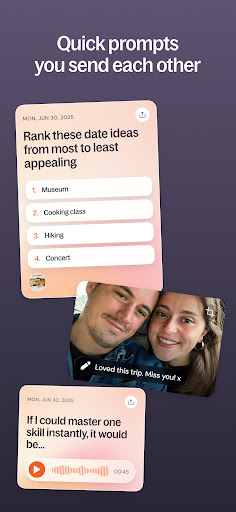
Sparks
Short prompts you and your partner answer separately, then compare. You don't see their answer until you've done yours. Takes minutes - gets you past the logistics and into something real.
Talk to Em
Voice or text conversations with Em, available whenever you need her. Talk to her solo to think something through privately - what you share stays between you and her. Or bring her in as a couple when you have something specific to work through together. Em keeps things on track and sends a useful summary at the end.
Set up a recurring relationship check-in and Em handles the structure so you actually cover what matters, not just what's top of mind.
Plans
Guided programs on communication, conflict, and connection. Each chapter pairs short expert content with something to actually do - a conversation with Em, a challenge, or a nudge. Work through them at your own pace.
Quizzes
Find out something new about yourself and your partner. Start with the Love Animals Quiz - discover your relationship personality type, whether you're the dolphin, the hawk, or one of six others - and understand what drives you both.
***What you’ll get***
- Playful, lighthearted, straightforward practices that take less time than scrolling Instagram.
- See your patterns clearly enough to actually change them.
- A habit that builds quietly - without it feeling like work.
**Subscription Information**
Ember offers an auto-renewing 1-month and annual subscription – both of which give you full access to the entire library of content, app features and two hours of talk time with Em per month for as long as you maintain an active subscription.
Payment will be charged to your Apple account at the time of initial subscription purchase. Subscriptions automatically renew unless you cancel your subscription at least 24 hours before the current subscription period ends. Your account will be charged for renewal within 24 hours prior to the end of the current period end date.
You may cancel your subscription at any time by going to your Account Settings and tapping on “Manage Membership” after the purchase.
---
Ember is designed for users 18+. Ember is not therapy, and is not a replacement for any medical diagnostic or treatments. Ember cannot, and does not intend to, provide medical advice or diagnosis.
Ember is not designed to be used in crisis. If you are in crisis, please seek out professional help, or a crisis line. You can find resources at www.findahelpline.com.
Terms of Use: https://www.apple.com/legal/internet-services/itunes/dev/stdeula
Privacy Policy: https://www.embercouples.com/privacy-policy
How to Download Ember: For Couples APK
- Enter the package name
ai.usapp.usappon the APK Downloader homepage. - Select your device architecture (ARM64 recommended for modern devices).
- Click Download to get the merged APK file.
- Transfer and install the APK on your Android device.
- Keep Updated: Visit APK Downloader regularly to search for and download the latest secure versions of your favorite apps.
Security & Signature Verification
This APK download is 100% safe. We verify that the cryptographic signature of the file matches the official developer credentials. No modifications or adware are injected.